Python Machine Learning Label Encoding – When we do classification, there will be alot of Labels that we are going to deal with that
these Labels can be in the form of words, numbers or something else, so when we are using Sklearn it expects numbers. so if the data are numbers then there is no problem, we can use
them directly to start training. But this is not usually the case.
In the real world, labels are in the form of words, because words are human readable. We
label our training data with words so that the mapping can be tracked. To convert word
labels into numbers, we need to use a label encoder. Label encoding refers to the process of
transforming the word labels into numerical form. This enables the algorithms to operate on
our data.
You can watch my previous article on Python Machine Learning
1: Python Machine Learning Introduction
2: Python Machine Learning Open Source Libraries
3: Python Machine Learning Preprocessing The Data
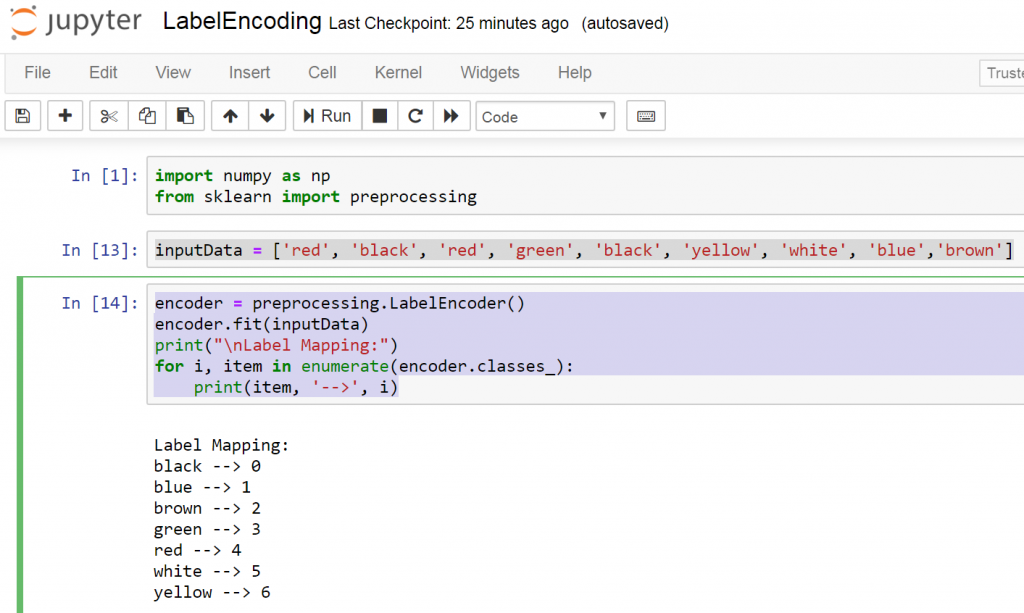
So this the code for the Python Machine Learning Label Encoding
|
1 2 3 4 5 6 7 8 9 10 11 12 |
import numpy as np from sklearn import preprocessing inputData = ['red', 'black', 'red', 'green', 'black', 'yellow', 'white', 'blue','brown'] encoder = preprocessing.LabelEncoder() encoder.fit(inputData) print("nLabel Mapping:") for i, item in enumerate(encoder.classes_): print(item, '-->', i) |
These line of code are our sample data
|
1 |
inputData = ['red', 'black', 'red', 'green', 'black', 'yellow', 'white', 'blue','brown'] |
And this is the mapping between words and numbers
|
1 2 3 4 5 |
encoder = preprocessing.LabelEncoder() encoder.fit(inputData) print("nLabel Mapping:") for i, item in enumerate(encoder.classes_): print(item, '-->', i) |
This is the result
|
1 2 3 4 5 6 7 8 |
Label Mapping: black --> 0 blue --> 1 brown --> 2 green --> 3 red --> 4 white --> 5 yellow --> 6 |
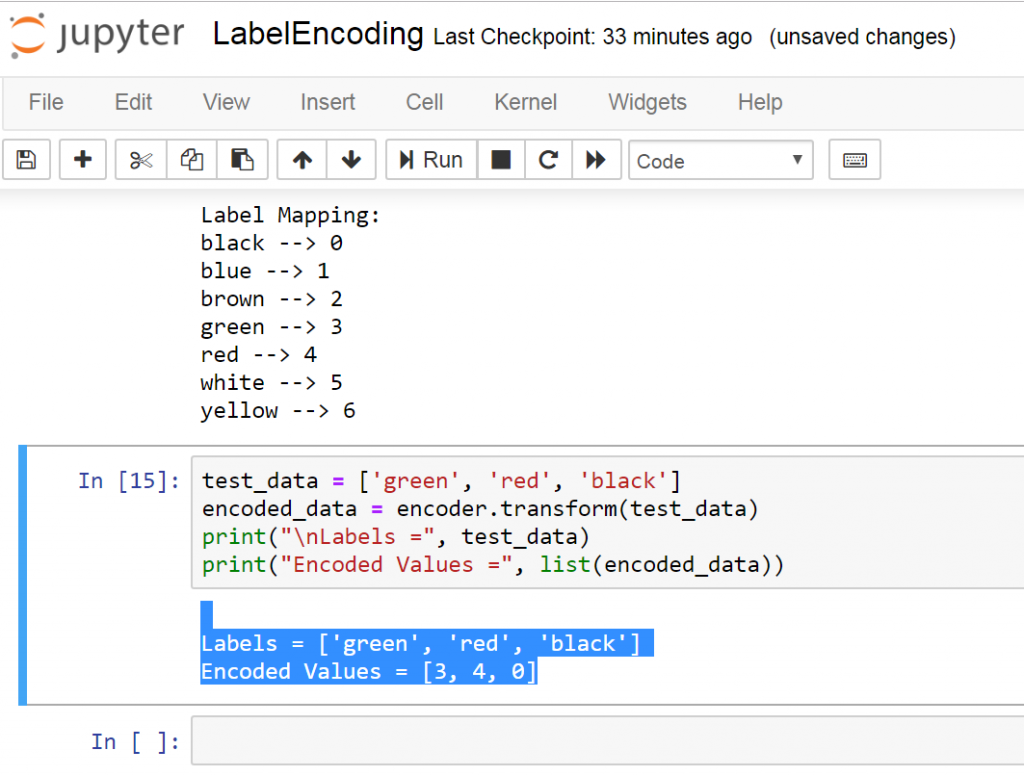
Let’s encode a set of randomly ordered labels to see how it performs:
Add these lines of codes to above code
|
1 2 3 4 |
test_data = ['green', 'red', 'black'] encoded_data = encoder.transform(test_data) print("nLabels =", test_data) print("Encoded Values =", list(encoded_data)) |
This the result
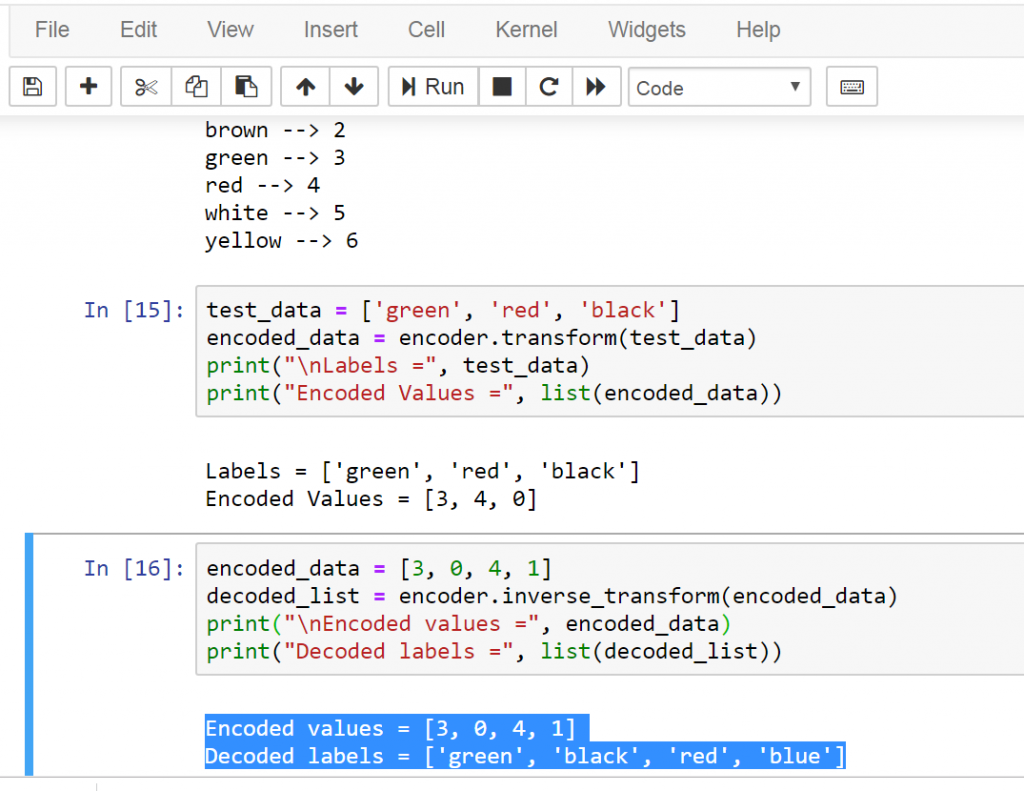
So now we are going to decode a random set of numbers:
Add these lines of codes
|
1 2 3 4 |
encoded_data = [3, 0, 4, 1] decoded_list = encoder.inverse_transform(encoded_data) print("nEncoded values =", encoded_data) print("Decoded labels =", list(decoded_list)) |
This is the result
Complete code
|
1 2 3 4 5 6 7 8 9 10 11 12 13 |
import numpy as np<br data-mce-fragment="1" />from sklearn import preprocessing inputData = ['red', 'black', 'red', 'green', 'black', 'yellow', 'white', 'blue','brown'] encoder = preprocessing.LabelEncoder()<br data-mce-fragment="1" />encoder.fit(inputData)<br data-mce-fragment="1" />print("nLabel Mapping:")<br data-mce-fragment="1" />for i, item in enumerate(encoder.classes_):<br data-mce-fragment="1" />print(item, '-->', i) test_data = ['green', 'red', 'black']<br data-mce-fragment="1" />encoded_data = encoder.transform(test_data)<br data-mce-fragment="1" />print("nLabels =", test_data)<br data-mce-fragment="1" />print("Encoded Values =", list(encoded_data)) encoded_data = [3, 0, 4, 1]<br data-mce-fragment="1" />decoded_list = encoder.inverse_transform(encoded_data)<br data-mce-fragment="1" />print("nEncoded values =", encoded_data)<br data-mce-fragment="1" />print("Decoded labels =", list(decoded_list)) |