In this article i want to show you How To Create TextBox In Python TKinter. also you can read more articles on Python GUI Development.
Also you can read more articles on Python GUI Development
1: PyQt5 GUI Development Tutorials
2: Pyside2 GUI Development Tutorials
3: wxPython GUI Development Tutorials
4: Kivy GUI Development Tutorials
Python Web Development Tutorials
1: Flask Web Development Tutorials
2: Django Web Development Tutorials
So this is the complete code for How To Create TextBox In Python TKinter
1 2 3 4 5 6 7 8 9 10 11 12 13 14 15 16 17 18 19 20 21 22 23 24 25 26 27 | import tkinter as tk from tkinter import ttk window = tk.Tk() window.title("Python Tkinter Text Box") window.minsize(600,400) def clickMe(): label.configure(text= 'Hello ' + name.get()) label = ttk.Label(window, text = "Enter Your Name") label.grid(column = 0, row = 0) name = tk.StringVar() nameEntered = ttk.Entry(window, width = 15, textvariable = name) nameEntered.grid(column = 0, row = 1) button = ttk.Button(window, text = "Click Me", command = clickMe) button.grid(column= 0, row = 2) window.mainloop() |
This line of code is for creating object of TKinter.
1 | window = tk.Tk() |
In these line of codes we set the title and also the size of our window.
1 2 | window.title("Python Tkinter Text Box") window.minsize(600,400) |
So this method is for click events that we are going to handle the click events of button and you will see that we connect this method to our button. also we have created a label.
1 2 3 4 5 | def clickMe(): label.configure(text= 'Hello ' + name.get()) label = ttk.Label(window, text = "Enter Your Name") label.grid(column = 0, row = 0) |
This line of code is for getting the entry from the user.
1 | name = tk.StringVar() |
So this is the TextBox we are going to create, in TKinter we have Entry for the TextBox.
1 2 | nameEntered = ttk.Entry(window, width = 15, textvariable = name) nameEntered.grid(column = 0, row = 1) |
Also we create a button because we want to handle the click events. and if you remember now we connect our def clickMe() method in here.
1 2 | button = ttk.Button(window, text = "Click Me", command = clickMe) button.grid(column= 0, row = 2) |
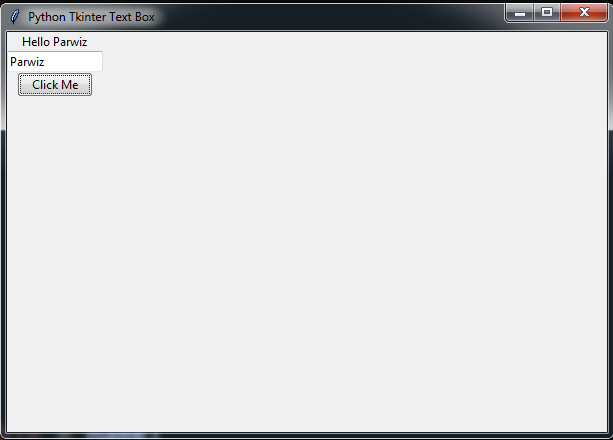
Run the complete source code and this will be the result
Also you can watch the complete video for this article

Not the answer you re looking for? Browse other questions tagged python tkinter or ask your own question .
atmosferis
سلام پرویز :)))
علیکم سلام